How to get a Tesla-style dashboard on Android
Want a Tesla-style dashboard on your Android phone? What that clean, minimal cockpit look really is, and how to get it with a dashboard app in any car.
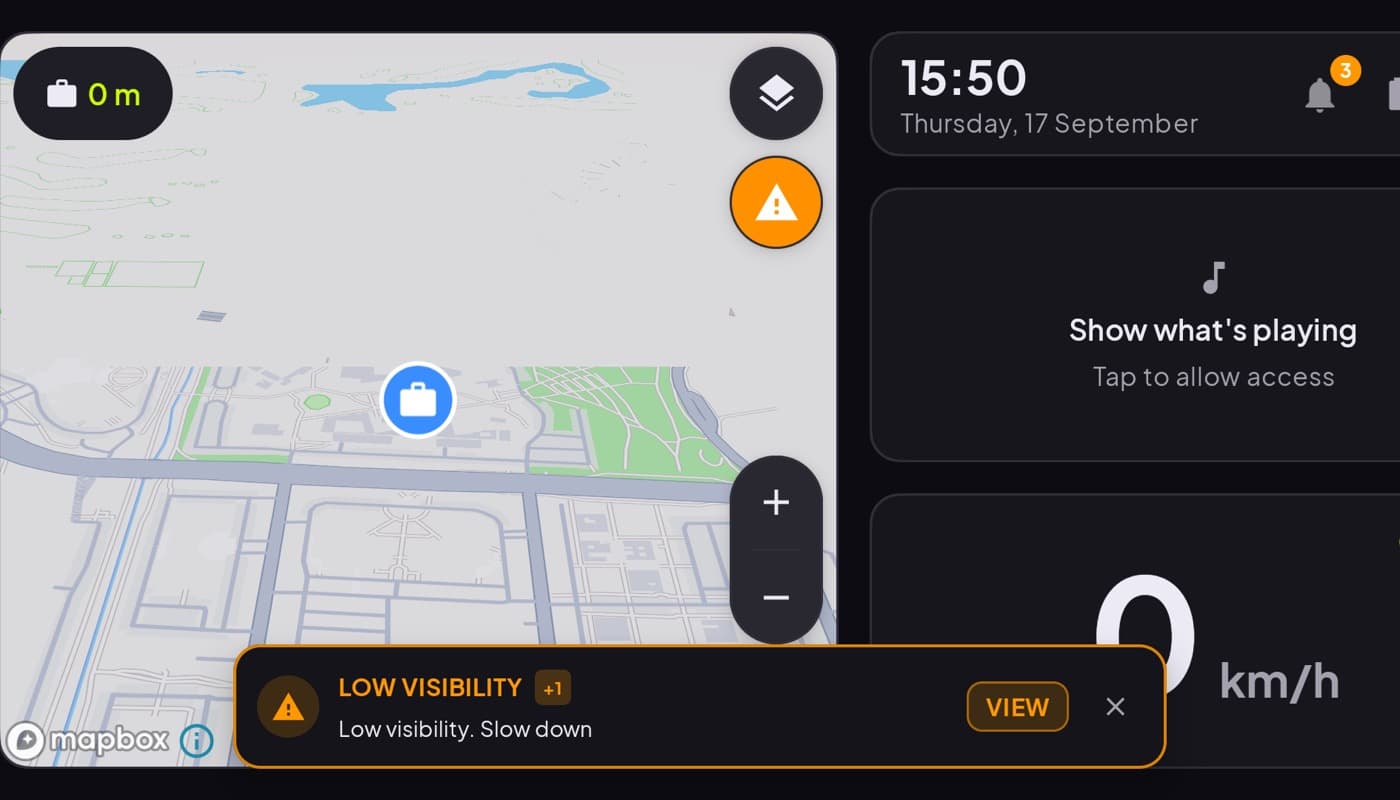
People search for a "Tesla-style dashboard" because they love the look: a clean, dark screen with one big speed readout, a crisp map, and none of the busy clutter of a traditional gauge cluster. The good news is that aesthetic is not locked to Tesla, it is a design philosophy you can bring to any car with a phone. Here is what makes it work.
We make a dashboard app built in that minimal spirit (Car Dashboard), so this has a stake, but the design principles are universal.
What the "Tesla look" actually is
Strip away the brand and the Tesla dashboard aesthetic is really a few rules:
- Dark background. Black or near-black, easy on the eyes, especially at night.
- One hero element. A big, clean speed number, not a ring of gauges competing for attention.
- A crisp map as the main canvas, with navigation woven in.
- Minimal chrome. No skeuomorphic dials, no gradients, no noise, just clear type and a little space.
- High contrast. Light elements on dark, readable in a glance.
It is minimalism applied to driving: show less, but show it bigger and clearer.
Why it works for driving
The Tesla look is not just pretty, it is functional. A glanceable cockpit with one big number and a clean map is genuinely safer than a busy panel, because your eye finds what it needs instantly and returns to the road. Minimal is the feature.
How to get it on Android
You do not need a Tesla, or even a fancy car. You need a dashboard app with a minimal, dark design and a mounted phone:
- Mount your phone low and central, in landscape.
- Run a dashboard app with a clean, dark cockpit.
- Turn on the dark / night theme and keep the layout minimal.
Car Dashboard is designed in that spirit: a dark, cinematic cockpit with a big glanceable speed cluster, a 3D map, and clean type, minimal, high-contrast, built for a dash mount, with music, radio and hands-free calling a tap away when you want them. You get the Tesla-style feel in whatever you drive. Coming soon on Google Play.
The honest note
This is about the look and feel, a clean, minimal, dark cockpit, not about mimicking Tesla's actual software or claiming any affiliation. It is an independent app that brings a minimalist dashboard aesthetic to any Android phone. If your car has no built-in screen at all, this is how you get a modern-looking cockpit without buying a new car.
The short version: the Tesla dashboard look is really just good minimalism, dark, big, clean, and you can have it on any car with a phone dashboard app.
Frequently asked questions
- Can I get a Tesla-style dashboard on my Android phone?
- Yes, the aesthetic, not the actual Tesla software. The 'Tesla look' is a clean, dark, minimal cockpit with one big speed number and a crisp map. A dashboard app with a minimal dark design gives you that feel on a mounted phone in any car. Car Dashboard is built in that spirit.
- What makes the Tesla dashboard look work?
- Minimalism: a dark background, one hero element (a big clean speed readout), a crisp map, minimal chrome, and high contrast. It's not just style, a glanceable cockpit with less clutter is genuinely safer, because your eye finds what it needs and returns to the road faster.
- Do I need a special car for a Tesla-style dashboard?
- No. The look is a design philosophy, not hardware. With a dash-mounted Android phone and a dashboard app that uses a dark, minimal cockpit, you can get the Tesla-style feel in any car, including older ones with no built-in screen.
Turn your phone into the cockpit
Car Dashboard puts a big glanceable speedometer, maps, music and hands-free calling on one dark, landscape screen, in any car. Coming soon on Google Play. Join the waitlist for launch.
Get notified the day it lands on Google Play. No spam, one email.