What is a car dashboard app?
A plain-English explanation of what a car dashboard app is, what it does, how it differs from Android Auto and CarPlay, and who should use one.
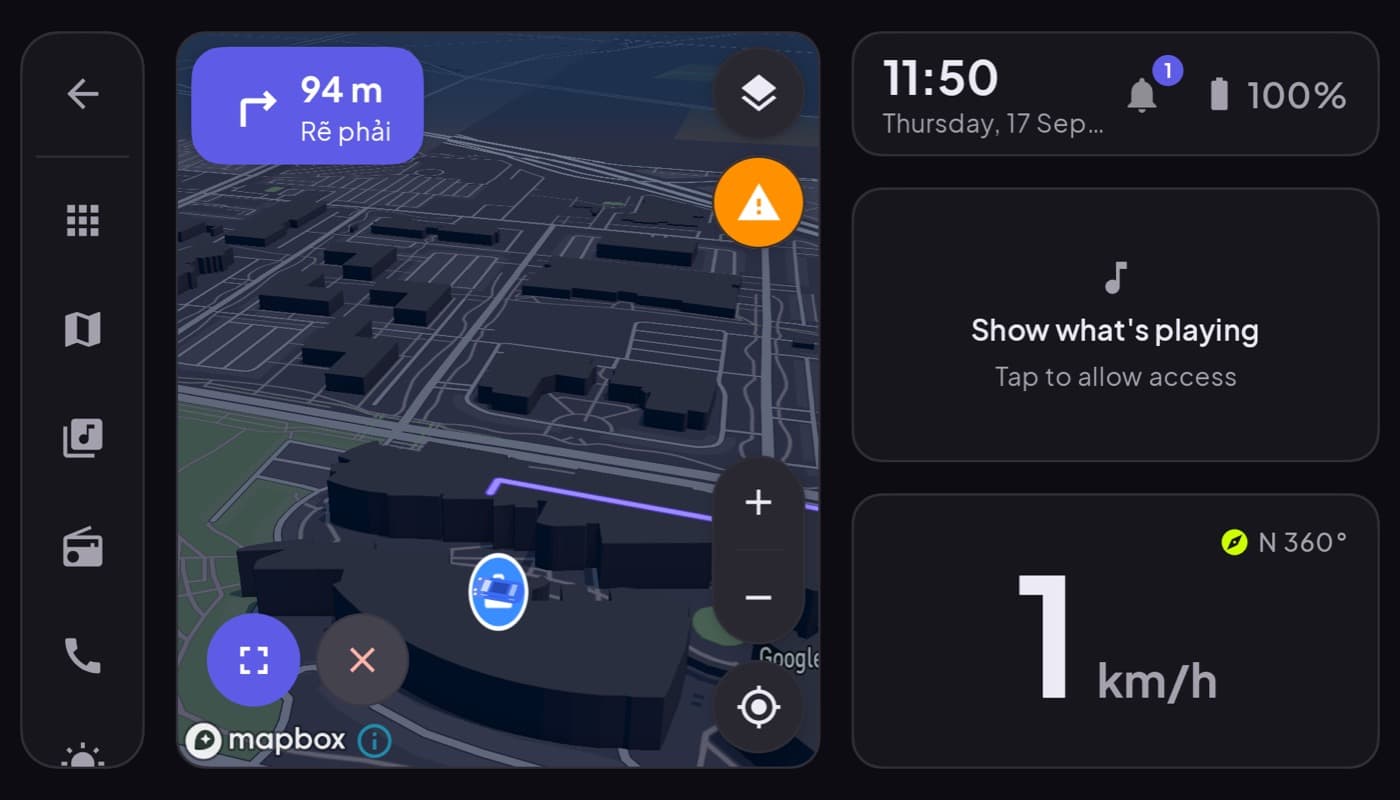
A car dashboard app is one of those things that is obvious once you see it, but the name confuses people because "dashboard" and "CarPlay" and "Android Auto" all get tangled together. Here is the plain-English version.
We make one (Car Dashboard), so this has a stake, but the explanation is neutral.
The simple definition
A car dashboard app turns your phone into a car's instrument display. You mount the phone on the dash, open the app, and instead of a normal home screen you get a cockpit: a big speedometer, a clock, often weather and fuel, and quick access to maps, music and phone calls, all on one screen, designed to be read at a glance while driving.
That is the whole idea: your phone becomes the dashboard.
What it does
A typical car dashboard app puts these on one landscape screen:
- A large speedometer, usually GPS-based and often more accurate than the car's dial.
- Clock and date.
- Weather for where you are.
- Maps and navigation, one tap away.
- Music and internet radio with big controls.
- Hands-free calling.
- Sometimes live engine data via an OBD-II dongle.
And it is built to be glanceable, big text, high contrast, a dark theme for night, so a look barely leaves the road.
How it is different from Android Auto and CarPlay
This is the key distinction:
| Car dashboard app | Android Auto / CarPlay | |
|---|---|---|
| Runs on | The phone itself | Projects to the car's screen |
| Needs a compatible car | No | Yes |
| Works in any car | Yes | Only compatible ones |
| The display is | Your phone | Your car's built-in screen |
A dashboard app makes the phone the screen. Android Auto and CarPlay put your apps on the car's screen and need a compatible head unit. Different approach, same goal of safer driving.
Who should use one
A car dashboard app is ideal if you:
- Drive an older car or a base trim with no infotainment screen.
- Want a bigger, clearer speedometer or gauges than your car provides.
- Want your maps, music and calls on one screen instead of app-switching.
- Switch between different cars and want the same setup everywhere.
If your car already has Android Auto or CarPlay and you are happy with it, you may not need one, though many people still prefer the custom cockpit.
In one sentence
A car dashboard app turns a mounted phone into a glanceable driving cockpit that works in any car, no special hardware required. Car Dashboard is our take, a dark, landscape-first cockpit for Android, and it is coming soon on Google Play.
Frequently asked questions
- What is a car dashboard app?
- A car dashboard app turns your mounted phone into a car's instrument display, showing a big speedometer, clock, weather, maps, music and hands-free calling on one glanceable landscape screen. It runs on the phone itself, so it works in any car with no special hardware.
- Is a car dashboard app the same as Android Auto or CarPlay?
- No. Android Auto and CarPlay project your phone's apps onto the car's built-in screen and need a compatible head unit. A car dashboard app makes the phone itself the display, on a dash mount, and works in any car. They share the goal of safer driving but take opposite approaches.
- Do I need special hardware for a car dashboard app?
- Just a dash mount and ideally a charger, since the app keeps the screen on and uses GPS. No head unit or car compatibility is required. Optionally, a Bluetooth OBD-II dongle adds live engine data, but it isn't needed for the core cockpit.
Turn your phone into the cockpit
Car Dashboard puts a big glanceable speedometer, maps, music and hands-free calling on one dark, landscape screen, in any car. Coming soon on Google Play. Join the waitlist for launch.
Get notified the day it lands on Google Play. No spam, one email.