The best car dashboard apps for Android in 2026
An honest roundup of the best car dashboard apps for Android: what a good one puts on screen, what to avoid, and how to turn your phone into a proper dash display.
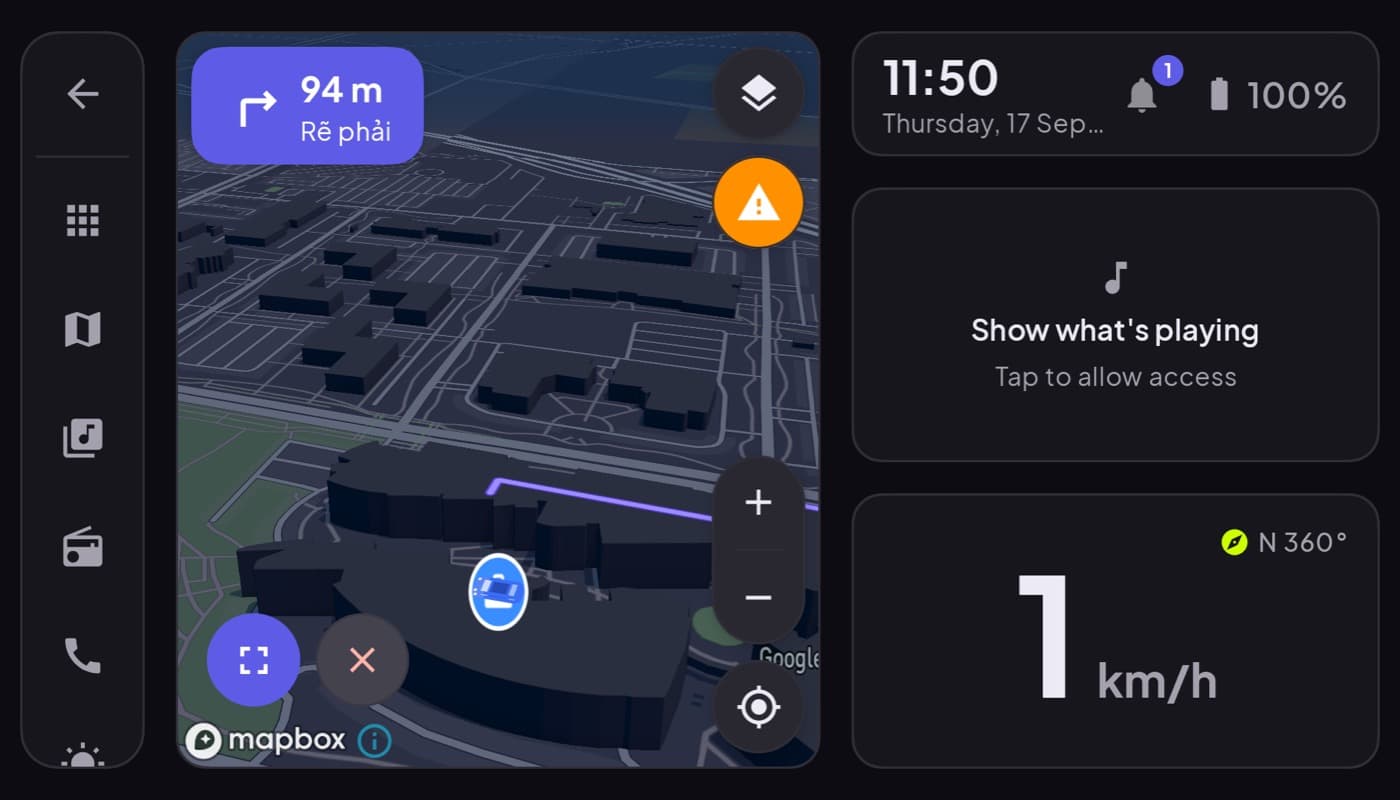
Disclosure up front: we build one of the apps here (Car Dashboard), so read this as a roundup with a stake in it, not a neutral referee. We will be straight about what the category does well and where every app, ours included, has to make tradeoffs.
Search "best car dashboard app for android" and you get a wall of apps that all promise to turn your phone into a cockpit. Most do the same handful of things: a big speedometer, a clock, maybe weather, maybe music. The difference is whether you can read them at a glance while driving, or whether you are hunting through menus at 60mph.
What a good car dashboard app actually does
Before the list, here is the bar. A car dashboard app earns its spot on your dash mount if it:
- Is glanceable. The speed and time should be legible in half a second, big digits, high contrast, no clutter.
- Runs landscape-first. Your phone sits sideways in the mount. An app that fights that is the wrong app.
- Dims for night. A dark, instrument-cluster look that does not blind you on a dark road.
- Keeps the essentials one tap away. Maps, music, a phone call. Not fifteen.
- Does not need a login to show you a speedometer. Friction has no place on a dashboard.
The kinds of car dashboard app
Once you look past branding, they split into a few camps:
| Type | What it is for | Watch out for |
|---|---|---|
| Speedometer-first | A giant GPS speed readout | Often just that, nothing else |
| Full launcher | Speed + maps + media + phone | Can get cluttered |
| OBD dashboards | Live engine data from an OBD dongle | Needs hardware, setup |
| Projection apps | Mirror the phone to a head unit | Not the same as a dash app |
Most people searching this term want the full launcher: one screen, the stuff that matters, built for a mount. That is the camp worth most of your attention.
What to look for by driver type
- Commuter: glanceable speed, clock, and a one-tap route home. You want less on screen, not more.
- Road-tripper: 3D maps, music, and internet radio matter more than gauges.
- Gauge nerd: you want OBD-II telemetry, coolant, RPM, real fuel, and you already own a dongle.
Where Car Dashboard fits
Car Dashboard is our landscape-first take. One screen holds a big glanceable speedometer, clock, weather and fuel, with music, internet radio, hands-free calling and 3D maps a single tap away, in a dark cockpit design that is easy on the eyes at night. It is built for a dash mount, works without a login, and adds OBD-II live data if you have a dongle.
The honest part: it is a dashboard launcher, not Apple CarPlay or Android Auto. It does not mirror your phone to a car head unit. If your car has a built-in screen you want to cast to, that is a different kind of app. If your phone is the screen, on a mount, this is exactly what it is for.
How to choose
Pick based on the drive you actually do. Want a clean speed-and-maps cockpit for the commute? Almost any solid launcher works, and the fewer taps the better. Want gauges? Get one with OBD. Want the whole cockpit in one dark, glanceable screen built for a mount? That is what we built Car Dashboard to be. It is coming soon on Google Play, join the waitlist and we will tell you the day it lands.
Frequently asked questions
- What is the best car dashboard app for Android?
- It depends on your drive. Commuters want a clean, glanceable speedometer and one-tap maps; road-trippers want maps, music and radio; gauge fans want OBD-II telemetry. The best full-launcher dashboard apps put all of that on one landscape screen built for a dash mount. Car Dashboard is our take, coming soon to Google Play.
- Do car dashboard apps work without the internet?
- The core dashboard, speedometer, clock, and gauges, works offline because speed comes from GPS. Maps, weather and internet radio need a connection, but a good app keeps the essential cockpit readable even with no signal.
- Is a car dashboard app the same as Android Auto?
- No. Android Auto projects a special interface onto your car's built-in head unit. A car dashboard app runs on the phone itself, on a dash mount, and turns the phone into the display. They solve different problems.
Turn your phone into the cockpit
Car Dashboard puts a big glanceable speedometer, maps, music and hands-free calling on one dark, landscape screen, in any car. Coming soon on Google Play. Join the waitlist for launch.
Get notified the day it lands on Google Play. No spam, one email.