How to turn your phone into a car dashboard
A step-by-step guide to turning your Android phone into a car dashboard: the mount, the charger, the app, and the settings that make it glanceable and safe.
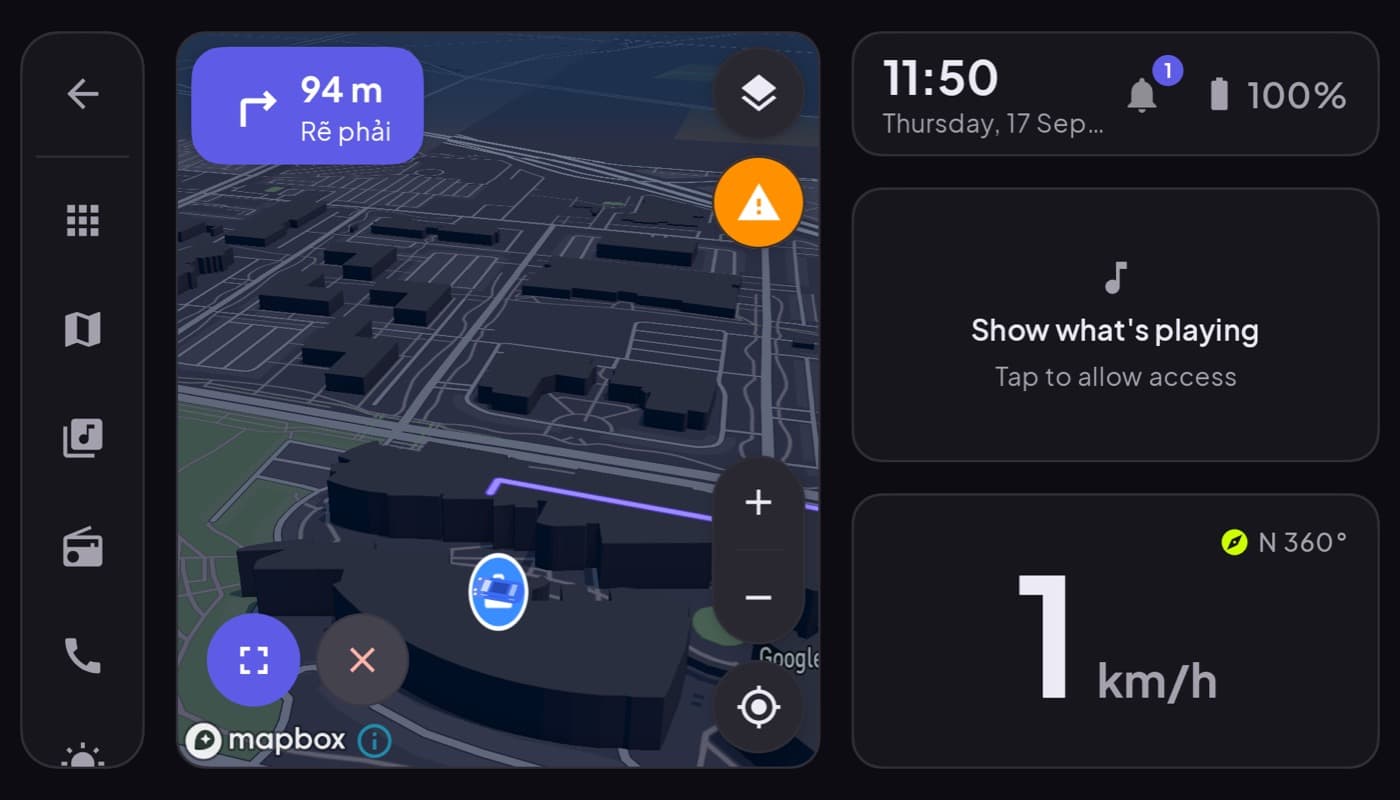
Turning your phone into a car dashboard is one of the highest-value, lowest-cost upgrades you can make to an older car. For the price of a mount you get a big speedometer, live maps, music and hands-free calling, no new head unit, no installation. Here is how to do it properly, so it is genuinely useful and genuinely safe.
We make a dashboard app (Car Dashboard) that handles the software half, but the hardware and setup advice below applies whatever app you choose.
What you need
Three things, that is all:
- A solid dash or vent mount. The single most important purchase. A wobbly mount makes everything harder to read and more distracting. Get one that holds the phone rock-steady in landscape.
- A charger. Dashboard apps use GPS and the screen stays on, so they drain battery. Run a cable to a 12V or USB port so the phone charges as you drive.
- A dashboard app. The software that turns the screen into a cockpit instead of a lock screen.
Step 1: mount it low and central
Position matters more than people think. Mount the phone low and toward the center of the dash, so glancing at it barely moves your eyes off the road, and so it never blocks your view of traffic. Landscape orientation, angled slightly toward you.
Step 2: keep it powered and cool
Plug in the charger and route the cable tidily so it does not dangle near the gear shift. On hot days, keep the phone out of direct sun where you can, screen-on plus GPS plus sun is how phones overheat.
Step 3: install and set up the app
Install a car dashboard app and set it up before you drive:
- Pick your units (mph or km/h).
- Set your default map and music.
- Turn on the dark / night theme.
- Set your favorite radio stations or playlist so you are not searching while moving.
Car Dashboard puts all of this on one landscape screen, a big glanceable speedometer, clock, weather, maps, music and hands-free calling, and it does not make you log in to start. Coming soon on Google Play.
Step 4: make it auto-start
The best setups launch the dashboard automatically when you dock the phone or connect to the car's Bluetooth, so you never tap around before pulling off. Set that once and forget it.
Step 5: drive glanceably
The whole point of a dashboard is the glance, half a second, eyes back on the road. Do not treat it as a phone you can browse. Set your destination and music before moving, then drive. If you need to change something big, pull over.
The result
A ten-year-old car with a phone dashboard has, in the ways that matter, a better driving display than many new cars: a bigger speedometer, live 3D maps, your music and radio, and hands-free calls, all in one dark, glanceable cockpit. For the price of a mount. That is why we built Car Dashboard, and it is coming soon.
Frequently asked questions
- What do I need to turn my phone into a car dashboard?
- Three things: a solid dash or vent mount that holds the phone steady in landscape, a charger since dashboard apps drain battery, and a car dashboard app that turns the screen into a cockpit. Mount it low and central, set it up before driving, and let it auto-start.
- Will using my phone as a dashboard drain the battery?
- Yes, because the screen stays on and GPS runs constantly, which is why a charger is essential. Plugged into a 12V or USB port, the phone charges faster than a dashboard app drains it, so battery is not a problem on the road.
- Is using a phone as a car dashboard safe?
- It can be safer than a normal phone in the car if you do it right: mount it low and central, use a glanceable app with big controls, set everything up before you drive, and only glance, never browse. A dashboard app is designed for exactly this, unlike a normal home screen.
Turn your phone into the cockpit
Car Dashboard puts a big glanceable speedometer, maps, music and hands-free calling on one dark, landscape screen, in any car. Coming soon on Google Play. Join the waitlist for launch.
Get notified the day it lands on Google Play. No spam, one email.