How to choose a car dashboard app: a buyer's guide
How to choose a car dashboard app: the checklist that matters, glanceability, features, permissions and honesty, and the traps to avoid before you install.
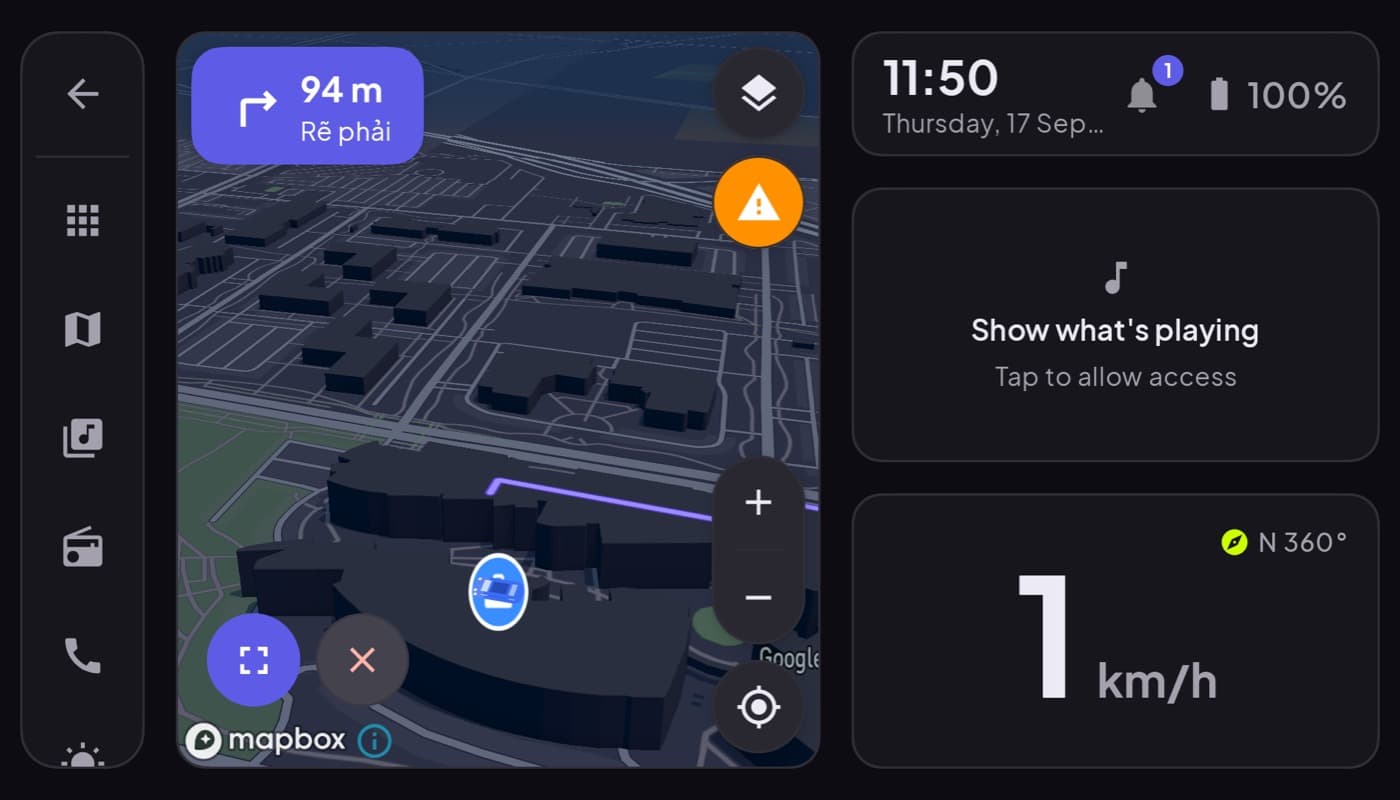
There are a lot of car dashboard apps, and the app-store descriptions all sound the same. This is the checklist that actually separates a good one from a distracting mess, so you can pick well before you install. Use it on any app, including ours.
We make Car Dashboard, so this has a stake, but the checklist is honest and works on every app.
1. Glanceability first
The single most important thing. A dashboard exists to be read in half a second, so your eyes go straight back to the road. Look for:
- A big, high-contrast speedometer and clock.
- A clean, uncluttered layout, fewer, bigger elements.
- A dark night theme that does not dazzle after dark.
If you cannot read the speed instantly in the screenshots, skip it. Glanceability beats every feature.
2. The features you actually need
Match the app to your drive, not a spec sheet:
- Commuter? Speed, clock, and one-tap maps. Less is more.
- Road-tripper? Maps, music and radio, weather.
- Gauge fan? OBD-II support.
A long feature list you will never touch is clutter, not value.
3. Honest permissions
A dashboard app legitimately needs location (for speed and maps) and maybe Bluetooth (for a dongle or audio). Be wary of one asking for contacts, storage, or the microphone without a clear reason. Overreaching permissions are a red flag on any app.
4. Auto-start and low friction
The best dashboards start when you dock the phone or connect to the car's Bluetooth, and let you drive in seconds. A login wall just to see a speedometer is friction you do not need.
5. Honesty about what it is
This is a subtle but important one. Be cautious of apps that claim to be CarPlay for Android or promise to "project" or "mirror" your phone to the car screen, a phone dashboard app makes the phone the display; it does not put your apps on the car's built-in screen (that is Android Auto). An app that misrepresents what it does will disappoint you in the car. Honesty in the description predicts honesty in the app.
6. Ads that stay out of the way
Free is fine; ads over your speedometer while driving are not. If there are ads, they should live in menus, never on the driving screen.
The quick checklist
| Check | Why |
|---|---|
| Glanceable in half a second | The whole point |
| Only the features you need | Clutter is dangerous |
| Sane permissions | Location + maybe Bluetooth, no more |
| Auto-start, no login wall | Drive in seconds |
| Honest about projection | Avoid disappointment |
| No ads on the driving screen | Safety |
The short version
Pick a car dashboard app on glanceability first, then honest permissions, the features your drive actually needs, and a truthful description. Everything else is noise. That is the bar we built Car Dashboard to clear, and the bar you should hold every app to. Coming soon on Google Play.
Frequently asked questions
- What should I look for in a car dashboard app?
- Glanceability first, a big high-contrast speedometer and clean layout you read in half a second, plus a dark night theme. Then honest permissions (location and maybe Bluetooth, not contacts), auto-start with no login wall, only the features your drive needs, and a truthful description. Ads, if any, should stay off the driving screen.
- What permissions should a car dashboard app need?
- Location, for GPS speed and maps, and optionally Bluetooth, for an OBD dongle or audio. That's it. Be wary of a dashboard app requesting contacts, storage or the microphone without a clear reason; overreaching permissions are a red flag worth avoiding.
- How do I avoid a bad or misleading car dashboard app?
- Check that it's glanceable in the screenshots, asks only for sensible permissions, and describes itself honestly. Be cautious of apps claiming to be 'CarPlay for Android' or to mirror your phone to the car screen, a dashboard app makes the phone the display and doesn't project to a built-in screen. Honest descriptions predict honest apps.
Turn your phone into the cockpit
Car Dashboard puts a big glanceable speedometer, maps, music and hands-free calling on one dark, landscape screen, in any car. Coming soon on Google Play. Join the waitlist for launch.
Get notified the day it lands on Google Play. No spam, one email.